Cameras in Java
Define measured mounts, capture requests and control policies in VisionConfig.java. Robot builds publish the profile; Spot stores physical USB bindings and intrinsic calibration.
Add a camera
Section titled “Add a camera”Edit offseason-bot/src/main/java/frc/robot/vision/VisionConfig.java in offseason-2026, or src/main/java/frc/robot/vision/VisionConfig.java in basic-robot-tester.
public static final SpotCameraConfig FRONT = new SpotCameraConfig(    "front",    true, // required camera    mount(.10, 0, .30, 0, 0, 0), // x/y/z metres; roll/pitch/yaw degrees    0, // image rotation: 0 or 180    new CaptureSettings(640, 480, 30, PixelFormat.MJPEG),    List.of(        Control.pinned("auto_exposure", 1),        Control.pinned("exposure_time_absolute", 5000), // µs        Control.tunable("gain", 20)));
public static final List<SpotCameraConfig> CAMERAS = List.of(FRONT);
Import SpotCameraConfig.Control and java.util.List for the short names. Replace the example mount with measurements and verify the requested capture combination and control values on the actual device.
Register the camera. A named constant alone is not enough: add it to
CAMERAS. The production profile intentionally stays empty until measurements exist. The offseason roles areleft,right,front,back, chassis-fixed and required, in that order.
Inspect saved mounts with the VS Code preview, then build/deploy robot code and bind physical feeds in Spot.
Camera settings
Section titled “Camera settings”SpotCameraConfig field |
Meaning |
|---|---|
name |
Unique logical role, such as front; bind the physical USB feed to it in Spot |
required |
Missing/unusable camera fails all-required-camera health; other valid cameras can still contribute |
robotToCamera |
Measured Transform3d in WPILib NWU: X forward, Y left, Z up |
imageRotationDeg |
Exactly 0 or 180; image orientation is separate from mount rotation |
capture |
One explicit, non-null CaptureSettings request |
controls |
Up to 64 unique control policies; List.of() leaves controls unpinned |
mount(xM, yM, zM, rollDeg, pitchDeg, yawDeg) converts degrees to WPILib radians. All six values must be finite. Positive pitch points the forward lens down. Rotations compose as yaw × pitch × roll. This helper supports fixed mounts; it supplies no joint-history configuration.
Names use [A-Za-z0-9][A-Za-z0-9_.-]{0,63}. Renaming a role is not a USB-device selector.
Capture settings
Section titled “Capture settings”Use new CaptureSettings(width, height, fps, pixelFormat) with a combination the camera actually advertises.
| Option | Bounds / meaning |
|---|---|
width |
Even integer, 1–4096 pixels |
height |
Integer, 1–4096 pixels |
fps |
Integer, 1–240; requested acquisition cadence, not detection FPS |
PixelFormat.MJPEG |
Compressed USB stream; normalized to MJPG internally |
PixelFormat.YUYV |
Uncompressed USB, 2 bytes/pixel; also called YUY2 |
Only MJPEG and YUYV are supported by this Java helper. Software bounds do not establish device support: even a lower FPS may be unsupported for a particular size/format. MJPEG can be decoded to YUYV in Jetson memory without sending raw YUYV over USB.
Changing capture settings changes the generated mode ID/signature. Calibration and timing must match. Changing focus or physical optics still requires recalibration even if capture settings stay the same.
Control policy
Section titled “Control policy”| Helper / field | Effect |
|---|---|
Control.pinned(name, value) |
Required control; enforce robot default |
Control.tunable(name, value) |
Required control; permit saved GUI override |
new Control(name, value, required, allowOverride) |
Explicit required/optional and pinned/tunable policy |
name |
Exact advertised V4L2 key, using the same bounded identifier syntax as camera names |
value |
Finite double; exposure uses µs, other controls use driver units/menu indices |
required=false |
Skip an absent control; an invalid value on a present control is still rejected |
allowOverride=true |
Permit a saved GUI value while editing is eligible |
Omitted controls remain editable in the GUI and retain saved values across deployments and Jetson restarts. Pinned entries always take precedence. A saved override can survive a new Java default; use Reset to code defaults to restore that default. Values must satisfy the device’s range, step and menu. Optional tunable example: new Control("sharpness", 0, false, true) only if that camera allows zero.
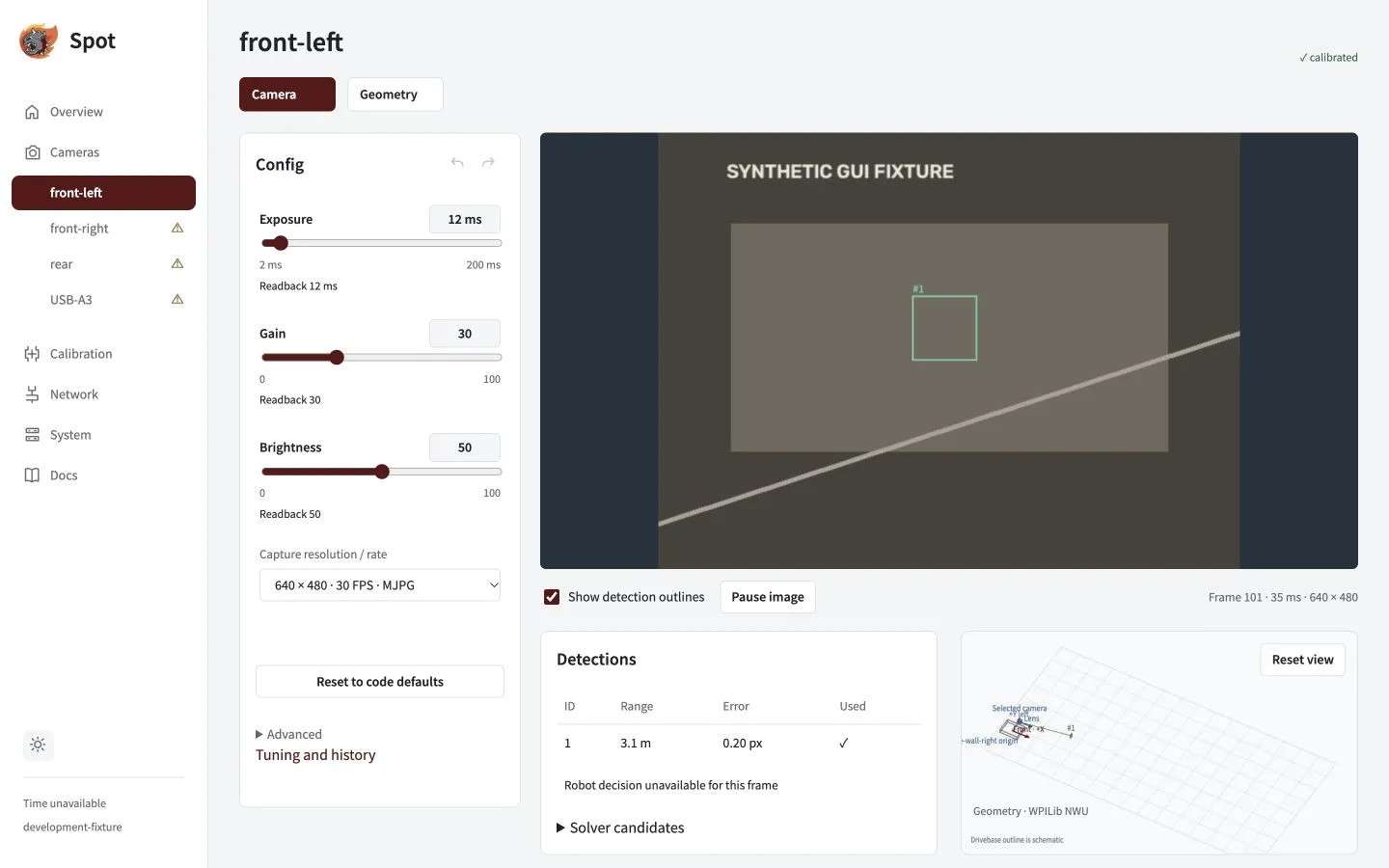
Use Config / Advanced for your device’s actual names, units, menus, limits, readback and locks. This screenshot uses demonstration values.
Exposure quick reference
Section titled “Exposure quick reference”| Control | Values / units |
|---|---|
auto_exposure or exposure_auto |
Common fixed-lens menu: 1 manual, 3 automatic; verify the advertised menu |
exposure_time_absolute or exposure_absolute |
Spot/Java use µs: 1000 = 1 ms; 5000 = 5 ms |
| Raw V4L2 exposure | 100 µs ticks: native 10 = 1000 µs |
autogain |
0 manual, 1 automatic, if advertised |
white_balance_automatic or white_balance_temperature_auto |
0 manual, 1 automatic |
power_line_frequency |
0 disabled, 1 = 50 Hz, 2 = 60 Hz, 3 automatic; use advertised entries |
Use the exact alias the device reports. Set manual mode before manual exposure, gain or white balance. Spot orders automatic controls before dependent writes. OpenCV fractional auto-exposure values such as 0.25/0.75 do not apply here.
| Capture rate | Maximum exposure with 100 µs steps |
|---|---|
| 30 FPS | 33,300 µs |
| 60 FPS | 16,600 µs |
| 120 FPS | 8,300 µs |
Exposure must also meet the driver range and step. Shorter reduces blur; longer collects more light. See Camera tuning for live adjustment and history.
Hardware reference
Section titled “Hardware reference”| Camera | Sensor / connection | Documented formats |
|---|---|---|
| SWYFT USB AprilTag Camera | 1280 × 800, mono global shutter, USB 2.0 | MJPEG only |
| Arducam UC-844 Rev.B / B0332 | OV9281, 1280 × 800, 3 µm pixels, mono global shutter, USB 2.0 | MJPEG; limited-rate YUY2 |
Both full-resolution images have 1,024,000 pixels (1.024 MP). Advertised or requested FPS is separate from delivered FPS and detector cadence. Test all cameras together on their actual USB topology.
Published modes and historical team observations
The SWYFT specifications advertise MJPEG up to 210 FPS at 160×120, 320×240, 352×288 and 640×400; up to 120 FPS at 640×480, 800×600, 1024×768, 1280×720 and 1280×800.
The Arducam B0332 datasheet lists MJPEG at 100 FPS for 1280×800, 800×600, 640×480 and 320×240; YUY2 at 10 FPS for 1280×800 and 1280×720. Older documentation differs: inspect your firmware’s descriptors.
Historical team logs used MJPEG 640×480 at requested 120 FPS for a Swift/Generic USB camera; higher advertised resolutions timed out. Attached Arducams were logged as UC762 at MJPEG 1280×720, requested 120 FPS. These are not UC-844 capability evidence. Historical exposure readings found a 5,000 µs minimum on the Generic camera and used 1,000 µs on attached Arducams; neither is a universal preset.
The earlier hardware reference was checked October 18, 2026, without access to the Jetson. Current firmware ranges and menu subsets still need per-device enumeration.
Image-control glossary
Use actual advertised ranges, steps and units, not an assumed 0–100 scale. Standard meanings come from the Linux user controls and camera controls.
| Control | Meaning |
|---|---|
gain |
Amplification; higher usually brightens and adds noise. No universal dB scale. |
brightness |
Black-level/luminance offset; does not collect more light. Zero need not be the midpoint. |
black_level |
Separate control if advertised; do not invent it as an alias for brightness. |
contrast |
Bright/dark separation; excess can clip tag edges and highlights. |
gamma |
Midtone response on a firmware-specific scale; 1 need not mean linear. |
sharpness |
Edge enhancement; standard minimum disables the filter. Excess creates halos. |
backlight_compensation |
Brighten subjects against bright backgrounds; standard minimum disables it. |
white_balance_temperature |
Kelvin, with automatic white balance off; may not affect mono output. |
saturation |
Color intensity; standard zero removes chroma if available. Usually unhelpful on mono. |
hue |
Color adjustment, not image rotation or camera heading; usually unhelpful on mono. |
Standard exposure-mode menu entries are 0 automatic exposure/iris, 1 manual exposure/iris, 2 manual exposure with automatic iris, 3 automatic exposure with manual iris. Select only advertised entries. Power-line frequency is anti-flicker control, not capture FPS.
Other controls and unsupported settings
Discovery supports advertised scalar int, bool, menu and intmenu controls. Booleans usually use 0/1; menus use exact listed integers, possibly with gaps. Inactive, read-only, disabled or grabbed flags can block edits. Button, string, array and write-only action controls are unsupported here.
Other cameras may advertise exposure_dynamic_framerate / exposure_auto_priority (0 holds FPS, 1 permits variation), focus_automatic_continuous / focus_auto (0 manual, 1 automatic), driver-specific focus_absolute, zoom_absolute, pan, tilt or iris. Use actual enumeration, not these example spellings. An M12 lens does not establish motorized control; SWYFT lists focus/zoom/pan/tilt/iris as unsupported.
convert_rgb / CAP_PROP_CONVERT_RGB is a host OpenCV property, not a portable UVC policy. Detector backend, decimation, preview encoding and detector FPS are not Control entries. RGB, GRAY8 and H.264 are not additional PixelFormat choices in this helper.
Read raw device capabilities on the Jetson
These read descriptors and controls without starting another capture stream. Choose an image-capture node, not a metadata node; /dev/video0 is only an inspection example.
v4l2-ctl --list-devicesv4l2-ctl --device=/dev/video0 --list-formats-extv4l2-ctl --device=/dev/video0 --list-ctrls-menusFor exposure, min=50 max=10000 step=1 default=166 value=50 means 5,000–1,000,000 µs, 100 µs steps, 16,600 µs device default and 5,000 µs current. The capture interval can impose a smaller maximum. Other integer controls retain advertised units. Legal values satisfy min ≤ value ≤ max and (value - min) % step == 0; menu values must also be listed. Device default, robot default and saved GUI override are distinct.
Profile settings and commissioning
| Setting | Purpose |
|---|---|
ROBOT_ID |
Bounded profile ID; keep offseason-2026 and basic-robot-tester distinct |
CAMERAS |
Registered constants; 32-camera software/protocol bound is not a Jetson capacity claim |
CAMERA_NAMES |
Planned role names/order; does not register cameras |
FIELD_LAYOUT |
WPILib AprilTag layout, default team 2026 welded; use surveyed poses for home prints |
TAG_SIZE_M |
Black-square size excluding white margin; >0 and ≤1 m, default 0.1651 m |
FUSION_ENABLED |
Default false; still subject to validation/DS suppression when enabled |
BenchConfig.STATIONARY_POSE |
Bench tester initial/reset pose only; robot supplies drivetrain/IMU history |
Field layout assets can be JSON; camera settings remain Java. Keep the blue-wall-right field frame consistent. The tester fuses only into its stationary bench estimator; production fusion needs hardware qualification and heading remains disabled.
Bind feeds, verify delivered capture/readback, calibrate with independent validation and qualify timing before robot fusion. Mode, orientation and optical controls can invalidate calibration; timing also depends on control readback. Rebuild/redeploy after code edits. These examples do not commission a physical camera.